You’ve been there before. A customer calls three weeks after you finished a plumbing job, claiming you scratched their hardwood floors. Or maybe you’re trying to explain to a homeowner why that "simple" bathroom refresh actually required a complete subfloor replacement.
Without proof, it’s your word against theirs.
In the trades, your work is your reputation. But if that work is hidden behind drywall or buried under a camera roll of 4,000 blurry photos of your kids and your lunch, it’s not doing you any favors.
The secret to protecting your business, winning more bids, and making your customers say "wow" isn't some $300-a-month project management software that takes three days to learn. It’s a professional before and after photo timeline.
And the best part? You can build one in about five minutes per job. Here is how to do it without the headache.
The "Photo Problem" Most Contractors Face
Most electricians, plumbers, and HVAC techs handle photo documentation in one of two ways:
- The "I'll do it later" method: You take a few photos, they sit in your phone’s gallery, and you forget which job they belong to. When you actually need them for a dispute or a social media post, they’re gone or buried.
- The "Over-Engineered" method: You try using a massive construction management suite. It’s clunky, it asks for 20 fields of data just to upload one photo, and your crew hates using it. So, eventually, everyone stops using it.
Neither of these works for a busy solo operator or a small team. You need a contractor photo app that is as fast as your hammer and as easy as sending a text.

Simple photo logging should take seconds, not minutes.
Why Timelines Are Your Secret Weapon
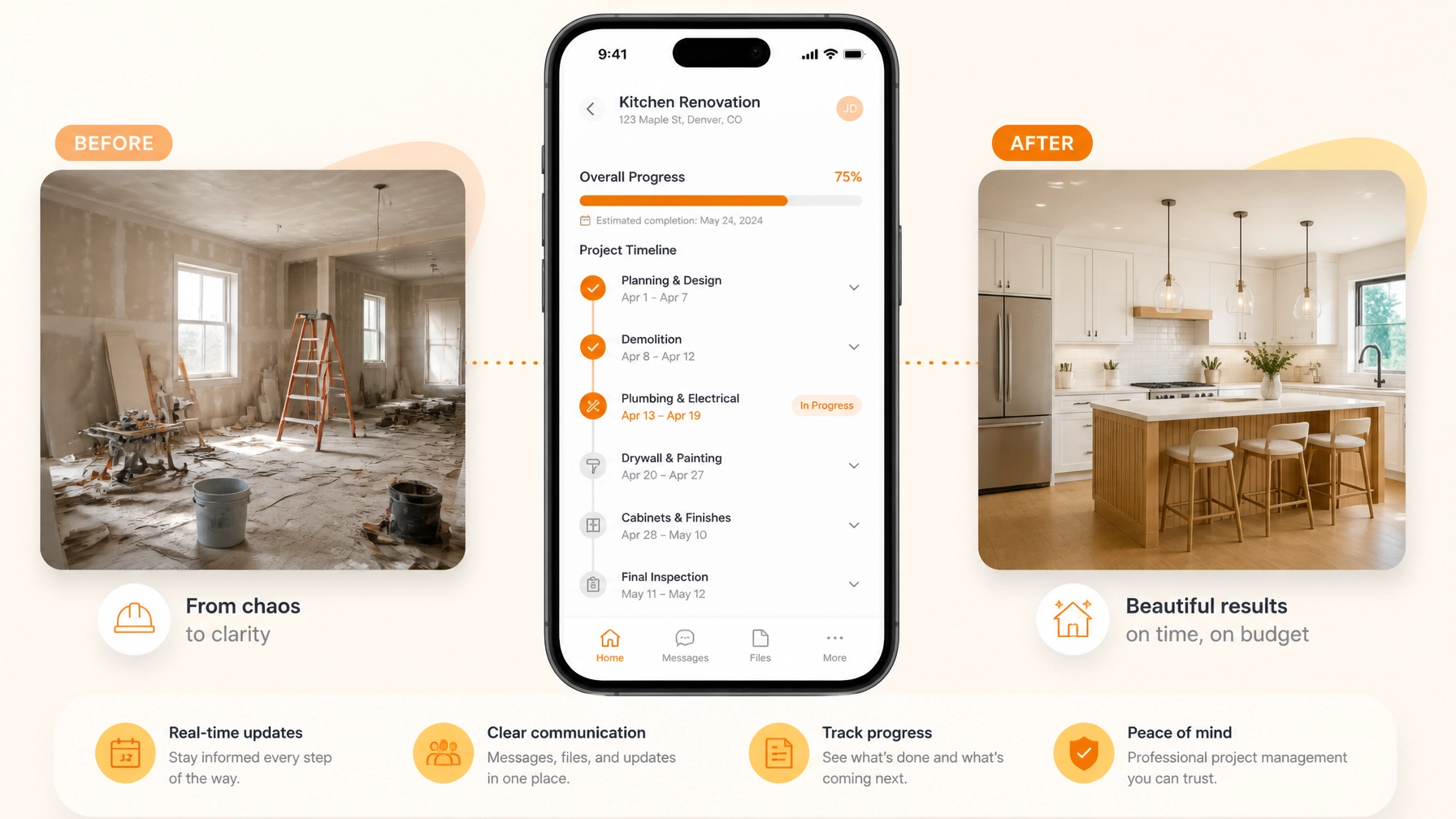
A photo timeline isn't just a gallery; it’s a story. It shows the "Before" (the problem), the "During" (your hard work and hidden quality), and the "After" (the professional result).
According to industry data, nearly 52% of construction rework is caused by poor project data and miscommunication. When you document the process visually, you aren't just taking pictures: you're creating insurance for your business.
1. Protection Against "He-Said, She-Said"
When you have a time-stamped photo of the floor before you brought your tools in, a damage claim disappears instantly. That’s the power of construction photo documentation.
2. Building Instant Trust
Homeowners are nervous. They’ve heard horror stories about contractors cutting corners. When you send them a link to a professional timeline showing the copper pipes you just installed before the walls went up, they know they’re getting what they paid for.
3. Marketing That Sells Itself
A clean before/after comparison is the best sales tool you have. You can show a prospect exactly how you transformed a similar space, making it much easier to justify a premium price.
The 5-Minute Workflow: How to Build Your Timeline
You don't need a degree in photography or a dedicated office admin to do this. Here is the simple, 5-minute workflow using a contractor job app like JobLuma.
Step 1: The "Before" Snap (30 Seconds)
The moment you walk onto the job site, open your app and create a new job. Take 2–3 wide shots of the area.
- Pro Tip: Always take one shot of the surrounding area (floors, walls, nearby furniture) to document the existing condition of the property.
Step 2: The "In-Progress" Log (2 Minutes Total)
Don’t wait until the end of the day. As you hit milestones: like finishing the rough-in or uncovering a hidden leak: snap a photo and add a quick note.
- "Found rusted pipe behind the vanity."
- "Rough-in passed inspection."
Step 3: The "After" Hero Shot (30 Seconds)
Once the tools are packed and the site is clean, take your final photos.
- Pro Tip: Try to stand in the same spot where you took your "Before" shots. This makes the transformation look much more dramatic and professional.
Step 4: Generate the Timeline (10 Seconds)
This is where the magic happens. Instead of emailing 15 individual attachments, a dedicated before and after photo app like JobLuma organizes these into a clean, branded timeline automatically.
Step 5: Share the Link (10 Seconds)
Send a single link to your customer via text or email. They don't have to download anything, create an account, or log in. They just click and see the beautiful work you did.

A professional "After" shot is your best marketing tool.
Why JobLuma is Different
Most contractor software is built for office managers sitting behind a desk. JobLuma was built for the person holding the wrench.
- No App Download for Customers: Your clients are busy. They don't want to download "ProjectPortal v4.2" just to see a photo of their new water heater. With JobLuma, you send a link, and they see the timeline in their browser.
- Mobile-First Design: We know you’re using your phone with gloves on or while balanced on a ladder. The interface is big, simple, and fast.
- Zero Bloat: We don't do payroll. We don't do complex Gantt charts. We do job logging and photo timelines better than anyone else.
If you’re looking for a simple way to manage your job photos, you’ve found it.
How Professional Timelines Win You More Business
Think about the last three bids you lost. Was it just about price? Usually, it's about perceived value.
When a homeowner receives two quotes: one as a plain PDF and one that includes a link to a "Sample Job Timeline" showing your past work: who do you think they trust more?
The contractor who documents their work is the contractor who takes pride in their work. That's a powerful message to send to a potential client. By using a photo timeline app, you are signaling that you are organized, transparent, and professional.

Documentation builds the trust that wins the next job.
Ready to Level Up Your Documentation?
Stop losing your best work in your camera roll. Start building a library of professional job logs that protect your business and impress your clients.
You can start creating your first timeline in seconds. Check out our pricing or sign up for free today to see how JobLuma can save you time and help you grow.
Creating professional timelines doesn't have to be a chore. With the right tools, it’s just another part of finishing a job well done.
Leave a Reply