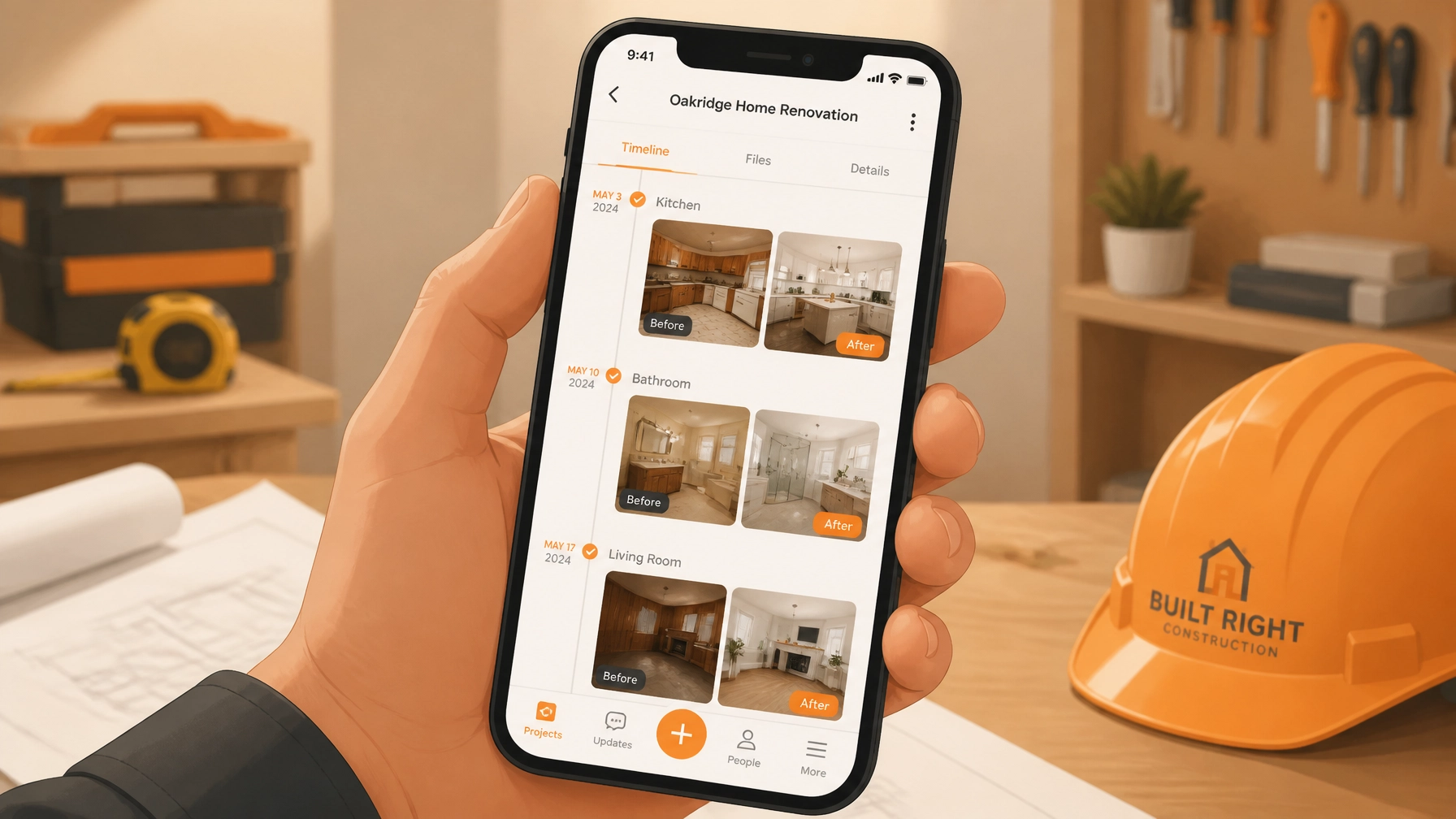
If you’re a contractor, you know the drill. You’re on-site, you finish a killer job, and you snap a few photos. Maybe you take a "before" shot of that bird’s nest of wiring or that leaky pipe, and an "after" shot of your pristine work.
But then what? Those photos end up in the digital equivalent of a shoebox: your phone’s camera roll. They’re buried between pictures of your kids, your dog, and that one weird thing you saw at the hardware store. When the customer asks for proof of work or your insurance company needs a record of pre-existing damage, you’re stuck scrolling for twenty minutes, praying you didn't accidentally delete them.
Creating a professional photo timeline shouldn't be a second full-time job. You’re an electrician, a plumber, an HVAC tech: not a data entry clerk.
In this guide, we’re going to show you how to use a simple contractor photo app like JobLuma to build a stunning, branded timeline for your customers in under five minutes. No bloat, no complex project management mazes: just clean documentation that makes you look like a pro.
Why Photo Documentation is Your Best Insurance Policy
Before we dive into the "how," let’s talk about the "why." Why bother with a before and after photo app at all?
1. Liability Protection
"It was like that when I got here." Every contractor has said it, but can you prove it? A time-stamped photo timeline is your best defense against false claims. By documenting pre-existing conditions before you even pick up a tool, you create an indisputable audit trail. If a client claims you cracked a tile or dented a wall, you can pull up the "before" photo in seconds.
2. Building Instant Trust
Transparency is the fastest way to build trust with a customer. When you send a professional link showing exactly what you did: especially the stuff hidden behind walls or under floors: the customer feels confident in the value you provided. It transforms a "trust me, it's fixed" conversation into a "here is the proof" experience.
3. Faster Invoicing and Fewer Disputes
Disputes usually happen when there’s a gap in communication. By providing construction photo documentation as a standard part of your workflow, you close those gaps. Customers are much more likely to pay an invoice quickly when they can see the progress of the job laid out in a clean, chronological timeline.

The Problem with "Big" Contractor Software
Most contractor software on the market today is built for giant construction firms with dedicated project managers. They want you to track every nail, manage complex Gantt charts, and pay for 50 features you’ll never use.
For solo operators and small crews, that’s just "bloat." You don’t need a digital maze; you need a tool that works as fast as you do. You need a contractor job app that lives in your pocket and stays out of your way.
That’s where JobLuma comes in. We’ve stripped away the noise to focus on the one thing that actually helps you finish a job: simple, professional documentation.

How to Create Your Timeline in 5 Minutes (Step-by-Step)
Ready to look more professional without the headache? Here is how you create a timeline using a mobile-first design built for the field.
Step 1: Create the Job (30 Seconds)
The moment you pull up to the site, open JobLuma. Tap "New Job." You just need the basics: the customer’s name and a quick description. You’re not filling out a 10-page report. You’re just creating a "bucket" for your photos.
Step 2: Snap the "Before" Photos (1 Minute)
Before you start the work, walk the site. Use the app to snap photos of the current state of things.
- The specific issue: The leak, the short, the clog.
- The surroundings: Prove there was no damage to the floors or walls nearby.
- The context: A wide shot of the area.
Because JobLuma is a photo timeline app, it automatically timestamps every photo. No more guessing when a photo was taken.
Step 3: Add Quick Notes (1 Minute)
Photos are great, but a quick note adds context that protects you. "Identified corrosion on main line" or "Water damage present upon arrival." Just a few words on each photo ensures there’s no confusion later.

Step 4: Capture the "After" Magic (1 Minute)
The work is done. It looks great. Before you pack up the truck, snap those "After" shots. Make sure to capture the same angles as your "Before" photos to create a powerful visual contrast. This is the "Before and After" sequence that sells your services for you.
Step 5: Share the Branded Timeline (30 Seconds)
Here is the secret sauce: the share link. In JobLuma, you hit "Share," and it generates a clean, professional web link. You can text or email this directly to your customer.
The "No-App" Advantage for Your Customers
One of the biggest friction points with other contractor photo apps is that they require the customer to download something.
Let’s be real: your customer doesn't want to download a "Project Management Portal," create a password, and verify their email just to see a photo of their new water heater. They’re busy. They want the information now.
With JobLuma, your customer clicks a link and sees a beautiful, branded timeline right in their mobile browser. It looks like a high-end website built just for them.
- No logins.
- No passwords.
- No "App Store" downloads.
This "no-app" experience makes you look like a tech-forward pro while keeping things incredibly simple for the client.

Real-World Use Cases for Every Trade
How does this look in the real world? Here is how different pros are using photo timelines to save time and win more work:
For Electricians
Document the state of the panel before you touch it. Take photos of the wire runs before the drywall goes up. When the homeowner asks why the bill was higher due to "unexpected wiring issues," you can show them the photo timeline of exactly what you found behind the wall.
For Plumbers
Nothing is more stressful for a homeowner than a leak. Documenting the "Before" (the mess), the "During" (the parts replaced), and the "After" (the clean, dry area) provides immense peace of mind. Plus, it proves you didn't leave a mess behind.
For HVAC Technicians
HVAC units are often in attics or crawlspaces where the customer never goes. A photo timeline is their only window into your work. Show them the old, clogged filters and the new, high-efficiency install. It’s the ultimate "Proof of Value."
For Handymen and Remodelers
Small jobs add up. By keeping a timeline for every client, you build a historical record. If you come back six months later for a different project, you can look at the old timeline to remember exactly what materials or colors you used last time.
Beyond the Job: Marketing Your Work
Once you have a library of professional before-and-after timelines, you have a goldmine for marketing. Instead of just telling people you do great work, you can show them.
While JobLuma focuses on the private sharing between you and your customer, the habit of taking these photos gives you a "portfolio" ready to go. You can easily download your best work to post on social media or your website, showcasing the transformations you've achieved.
Ready to Ditch the Camera Roll?
You didn't get into the trades to spend your evenings fighting with software. You got into it to build things, fix things, and help people.
JobLuma was built to get you back to what you love. It’s the simplest job photo logging app for contractors who want professional results without the enterprise-level price tag or complexity.
Stop burying your best work in your camera roll. Start building timelines that protect your business and impress your customers.
Check out our simple pricing and sign up today to start your first timeline.
Leave a Reply