You know the feeling. You just finished a 4-hour job, you’re covered in drywall dust or grease, and your phone is buzzing with the next customer asking when you’ll be there. You hop in the truck, wipe your hands on a rag, and realize: “Wait, did I take a photo of that wiring before I closed the wall?”
You scroll through your camera roll. You see a picture of your kid’s soccer game, three blurry screenshots of a parts manual, a meme your brother sent you, and: finally: a dark, grainy photo of some wires.
Is that the one? You think so. But now you have to email it to the homeowner, explain what they’re looking at, and hope they don't ask for a discount because they “didn't see what took so long.”
There’s a better way to work. In fact, there's a way to look like a high-end contracting firm with a full-time marketing department, all from your phone in under five minutes.
Let’s talk about how to use a before and after photo app to create professional job timelines that protect your work and wow your customers.
The Problem: "Project Management" is a Four-Letter Word
Most contractor software is built for people who sit in offices. They have complicated "Gantt charts," "resource allocation" sliders, and "client portals" that require your customers to create a username and password just to see a photo of their new sink.
Let’s be real: you’re a plumber, an electrician, or an HVAC tech. You don’t have time for a three-day training course on how to use your own software. You need something that works as fast as you do.
The "old way" of documenting jobs usually looks like this:
- Snap a bunch of random photos.
- Let them sit in your camera roll until you forget which job is which.
- Eventually text or email a few to the client (if you remember).
- Get into an argument three months later when the client claims you damaged something that was already broken.

Step 1: Snap as You Go (The "Before")
The secret to a great job timeline isn't taking better photos; it's taking them at the right time.
With a simple contractor photo app, the first thing you do when you step onto a job site is open the app and create a "New Job." It takes ten seconds. You put in the customer's name (e.g., "The Johnsons' Kitchen") and snap 2-3 "Before" photos.
Pro-tip: Capture the "hidden" stuff. Document the pre-existing crack in the tile, the old corroded pipe, or the messy wiring left by the guy before you. This isn't just for the timeline; it’s your insurance policy. According to industry data, visual evidence is the strongest defense against disputes and false claims.
Step 2: Log the Progress
As you work, keep your phone in your pocket. If you hit a milestone: like finishing the rough-in or installing the main unit: take one photo.
The beauty of a dedicated photo timeline app is that it automatically timestamps and organizes these photos for you. You don't have to create folders or rename files. You just snap, and the app builds the story.
This creates a "source of truth." If a builder or a homeowner asks why a project is taking longer than expected, you can point to the photo of the unexpected rot you found behind the wall. It’s hard to argue with a photo.
Step 3: The "After" (The Money Shot)
This is where the magic happens. Once the job is cleaned up and the tools are back in the truck, take one final, high-quality photo.
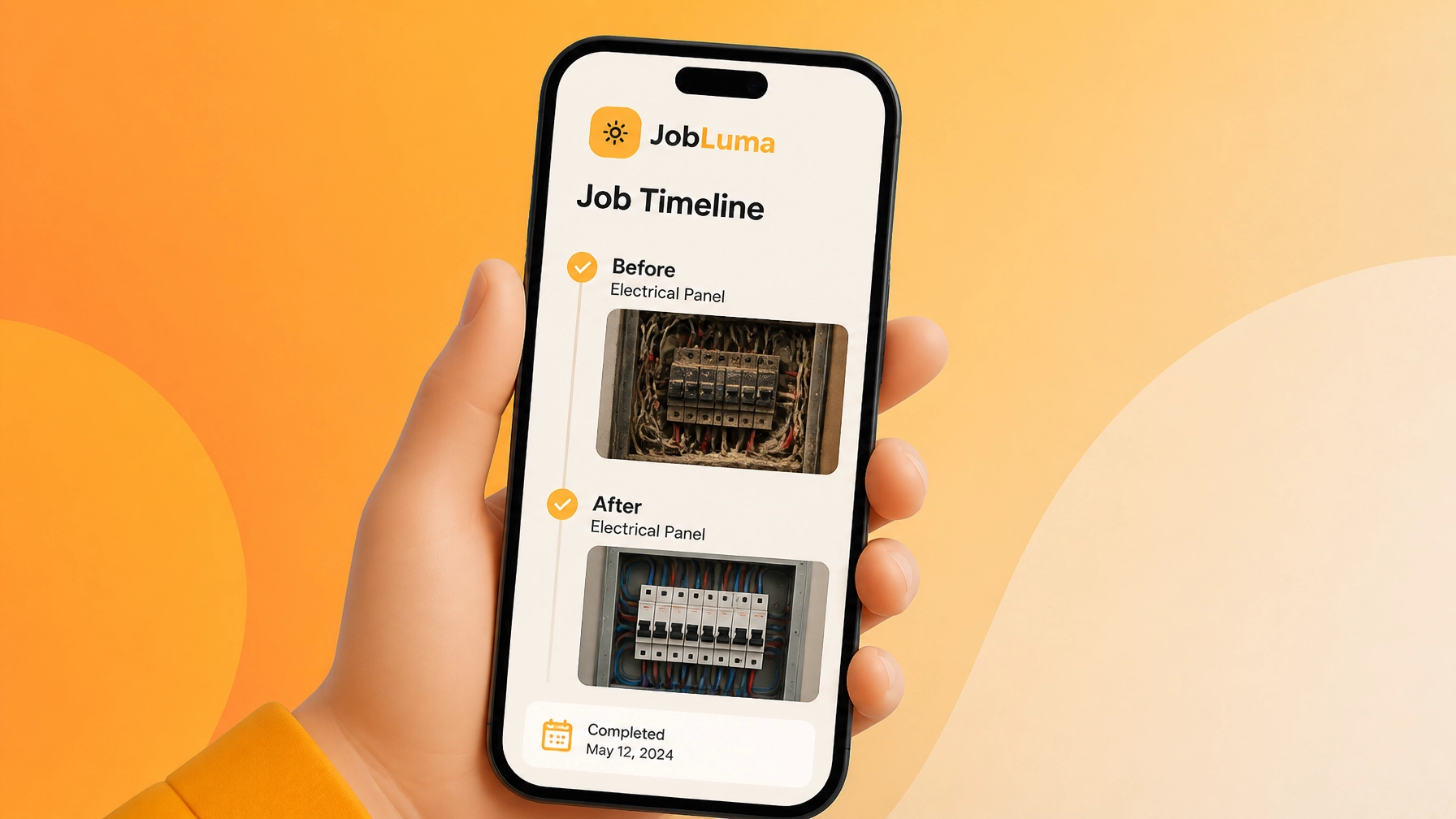
Using a before and after photo app allows you to show the transformation clearly. In JobLuma, these photos are presented in a clean, branded timeline. It turns "I fixed the leak" into "I transformed your utility room into a clean, modern space."

Step 4: Share the Link (No Downloads Required!)
This is the biggest hurdle with most contractor job apps: the customer experience. Nobody wants to download an app just to see photos of their own house.
With JobLuma, you don't ask your customers to sign up for anything. You just hit "Share," and it sends them a simple, professional link via text or email. They click the link, and a beautiful, branded timeline of your work opens in their mobile browser.
It looks professional, it’s easy to use, and it makes you look like the most organized pro they’ve ever hired.

Why This Matters for Your Business
You might think, "I’ve been doing fine without this for 10 years. Why start now?"
The market is changing. Customers today expect transparency. They are used to tracking their Amazon packages and their Uber rides in real-time. When you provide a professional construction photo documentation experience, you aren't just "showing photos": you’re building trust.
Here are three reasons why this 5-minute habit pays off:
- Faster Payments: When a customer sees the progress and the final result organized perfectly, they are much less likely to nitpick the invoice. Visual proof confirms that milestones have been met, which speeds up the billing process.
- Fewer "Recall" Visits: Sometimes a customer calls back saying something is "wrong." You can look at your timeline, see exactly how it was installed, and often diagnose the issue (or prove it wasn't your fault) without driving back to the site.
- Better Referrals: When you send that professional link, the homeowner is going to show it to their friends. "Look at what my electrician sent me!" That link is the best digital business card you could ever have.

Stop Searching, Start Logging
Your work is too good to be buried in a messy camera roll. You don't need a bloated project management suite that costs a fortune and takes hours to learn. You just need a way to show what you did.
Ready to see how easy it is? Check out our pricing and start building your first professional timeline today. It takes less than five minutes, but the impact on your business will last for years.
At JobLuma, we keep it simple so you can get back to the real work. No fluff, no complicated features: just the best contractor photo app for the modern tradesman.
Leave a Reply