
If you’re a plumber, electrician, or HVAC tech, you know that a picture is worth a thousand words: and potentially thousands of dollars. Whether you’re proving to a homeowner that a pipe was actually leaking or showing a GC that you finished your rough-in on time, photos are your best friend.
But here’s the reality: most contractors are doing photo documentation wrong.
Maybe your photos are buried in a messy camera roll next to pictures of your kid’s birthday party. Maybe you’re texting photos to clients, only for them to get lost in a group chat. Or worse, you’re paying for a massive, "all-in-one" construction management suite that’s so complicated your guys in the field refuse to touch it.
Effective construction photo documentation shouldn't be a chore. It should be the easiest part of your day. Let’s break down the seven biggest mistakes we see service contractors making and, more importantly, how to fix them so you can protect your business and look like a pro.
1. Skipping the "Before" Photo
We’ve all been there. You get to the job site, you see the problem, and you dive right in. You’re halfway through the repair before you realize you never took a photo of the original mess.
Without a "before" photo, your "after" photo loses half its value. You can’t show the dramatic transformation, and more importantly, you can’t prove the condition of the site before you started working. If a homeowner claims you scratched their flooring or cracked a tile, and you don’t have a photo showing it was already there, you’re on the hook.
The Fix: Make it a non-negotiable rule: no tools touch the ground until the "before" photos are taken. Using a dedicated before and after photo app makes this easy by prompting you to capture the baseline before you start the clock.
2. Using the Standard Smartphone Gallery
Your phone’s native camera roll is great for selfies, but it’s a disaster for business. When you have 4,000 photos on your phone, finding that specific shot of a junction box from three weeks ago is like finding a needle in a haystack.
When your photos are mixed in with your personal life, they aren't backed up to the project file, they aren't organized by job name, and they certainly aren't easy to share with your team.
The Fix: Stop using your personal gallery. Use a contractor photo app that keeps your work photos separate from your personal life. JobLuma allows you to organize photos by job automatically, so you never have to scroll through your weekend BBQ photos to find a proof-of-work shot.

3. Taking Photos Without Context
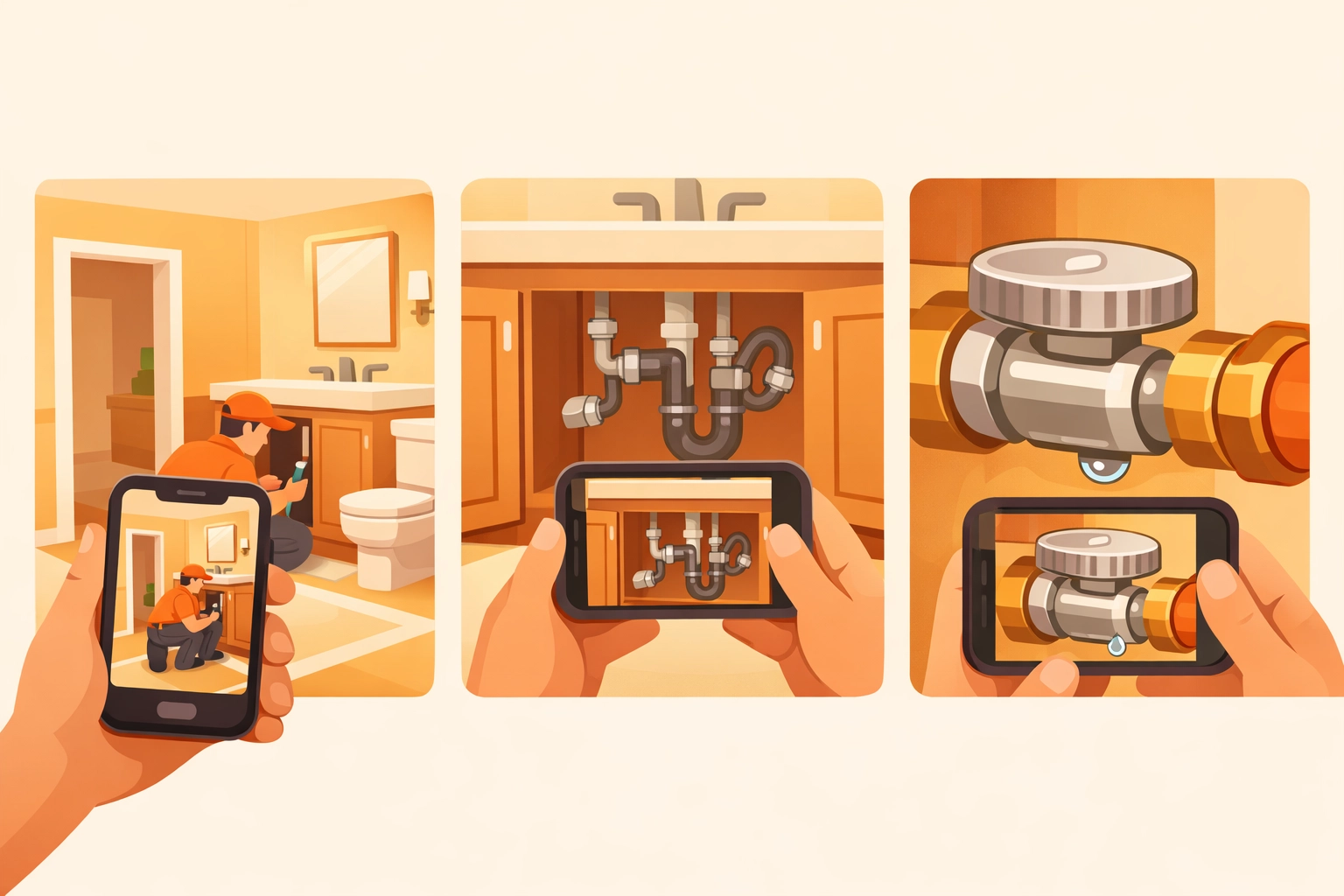
A close-up photo of a perfectly soldered pipe looks great, but if I can’t tell which room or floor it’s in, it’s useless for documentation. A common mistake is taking "micro-focused" photos without any "macro" context. If there’s a dispute later about where a specific leak was located, a tight shot of a pipe won't help you identify the location in the building.
The Fix: Use the "Wide-to-Tight" method.
- Take a wide-angle shot of the whole room or area to establish location.
- Take a medium shot of the specific fixture or area you're working on.
- Take the close-up of the detail (the weld, the wire, the serial number).
This provides a "map" for anyone looking at the photos later.
4. Relying on "Bloated" Project Management Software
Many contractors think they need the most expensive, feature-heavy software on the market to be professional. They sign up for platforms built for $50 million skyscraper projects when they’re running a residential HVAC business.
The result? The software is too slow, too click-heavy, and requires a three-day training course. If your software is a headache, your team will stop using it, and your photo documentation will fall apart.
The Fix: Look for contractor software that is mobile-first and built for speed. You want something that lets you snap a photo and move on. JobLuma was built specifically to avoid the "bloat." It’s simple, fast, and stays out of your way so you can get back to the actual work. Check out our features to see how we keep things lean.
5. Forgetting to Document What’s Behind the Walls
For electricians and plumbers, what happens before the drywall goes up is the most important part of the job. Once those walls are closed, your work is invisible. If a future contractor nails into a pipe or a wire, you need proof that you installed it according to code and in the right spot.
The Fix: Create a "pre-insulation" photo routine. Capture every wall cavity where you’ve run lines. Include a tape measure in the photo if possible to show exactly how far a pipe is from a stud or the floor. This photo timeline app approach creates a digital "X-ray" of the house that is incredibly valuable to homeowners and builders.
6. Making the Customer Experience Difficult
If you want to show your customers the progress you've made, how do you do it?
- Do you email 20 high-res attachments that bounce back because they’re too large?
- Do you force them to download a "Client Portal" app and create a password just to see three photos?
If the process is hard for the customer, they won't do it. Worse, it makes you look disorganized.
The Fix: Use a system that offers a "no-app-download" experience for the customer. With JobLuma, you can share a simple link with your client. They click it, and they can see the before and after timeline of their project right in their phone's browser. No logins, no friction, just professional transparency.

7. No Consistent Naming or Tagging
"IMG_4829.jpg" means nothing to you tomorrow, and it definitely means nothing to you six months from now. If you’re just dumping photos into a folder without labels, you’re creating a "dark archive" where information goes to die.
The Fix: Use a contractor job app that automatically tags photos with the date, time, and project name. If you need to find a photo of the "Master Bath Leak," you should be able to search that term and see the results instantly.
Why Simple Documentation Wins
The goal of photo documentation isn't to create a digital scrapbook; it's to protect your bottom line. When you have a clear, organized record of your work:
- You get paid faster: Clients can see the progress and the quality.
- You avoid liability: You have proof of existing damage and proper installation.
- You win more referrals: A professional-looking photo report makes you stand out from the "old school" guys who just scribble on a notepad.
At JobLuma, we believe that the best contractor photo app is the one you actually use. That’s why we’ve stripped away the complexity and focused on what matters: taking photos, organizing them by job, and sharing them with ease.

Stop Making These Mistakes Today
If you’re tired of losing photos or fighting with complex software, it’s time for a change. You don't need a degree in IT to manage your job sites. You just need a simple tool that works as hard as you do.
Ready to see how simple your photo documentation can be? Sign up for JobLuma today and start building a better timeline for your business. It’s mobile-first, simple by design, and built for the trades.
For more tips on running a more efficient contracting business, check out our blog or head over to our help center to see how easy it is to get started.
Leave a Reply